Skip ▸
Interactive Installation — Utrecht — 2026

CYBER
AWARE

An immersive audiovisual installation that places visitors in the role of a futuristic cybersecurity officer — confronting real-world digital threats through interactive surveillance gameplay and cinematic AI interfaces.

▸ Context

WHY CYBER AWARENESS MATTERS

Every day, thousands of people fall victim to cyberattacks that could have been prevented with basic awareness. Social engineering, phishing, rogue hotspots, and malicious devices are not hypothetical threats — they happen in schools, cafés, shopping centers, and offices.

CYBERAWARE uses immersive installation art to make these invisible threats visible. By stepping into the role of a security officer, visitors build intuition for recognizing attacks before they happen — in real life, without a surveillance system to help them.

↯
1 Attack Every 39 Seconds
A computer is hacked somewhere in the world every 39 seconds on average. Most victims had no idea they were being targeted.
⚠
95% Due to Human Error
95% of cybersecurity breaches are caused by human error — not technical vulnerabilities. Awareness is the most powerful defense.
AI
AI is Weaponized
Attackers now use AI to generate convincing phishing emails, deepfake voices, and automated credential harvesting — at unprecedented scale.
▸ The Threats

THREATS TO WATCH FOR IN 2026

These are the attacks actually hitting people right now — at home, at school, and at work. They don't need you to be a special target. They just need one moment of inattention. Here is how each one works, and exactly how to shut it down.

Threat 01 ● HIGH RISK
PHISHING EMAILS
Fake emails pretending to be your bank, a delivery company, or even your boss, designed to make you click a link or hand over a password. Today's versions are written by AI — no spelling mistakes, perfect logos, and genuinely convincing.
▸ How to protect
Check the real sender address, never click links in unexpected emails (type the site yourself instead), and verify any "urgent" request through a second channel first.
Threat 02 ● HIGH RISK
SMISHING — SCAM TEXTS
Scam text messages claiming to be your courier, your bank, or a "fraud team," with a link or a number to call. The link leads to a fake login page that captures whatever you type — username, password, even card details.
▸ How to protect
Real banks and couriers never ask for passwords or full card details by text. Don't tap links in texts — open the official app or type the website yourself.
Threat 03 ● MEDIUM RISK
QUISHING — MALICIOUS QR CODES
A QR code on a poster, parking meter, restaurant table or email sends you to a fake site or silently downloads malware. Attackers often stick their own code sticker directly over a real one.
▸ How to protect
Preview the link before opening it, be suspicious of any QR code that asks you to log in or pay, and never scan codes sent in unexpected emails.
Threat 04 ● HIGH RISK
AI VOICE CLONING & DEEPFAKES
With only a few seconds of audio, attackers clone a voice and call you sounding exactly like a family member or your CEO — panicking, begging for money or access. Video deepfakes now do the same on live calls.
▸ How to protect
Agree on a private "safe word" with family. If a call is urgent and emotional, hang up and call the person back yourself on their known number.
Threat 05 ● HIGH RISK
RANSOMWARE
Malware that locks every file on your device and demands payment to unlock them. It usually sneaks in through a malicious attachment, a pirated download, or a hacked website — and it can spread to everything on your network.
▸ How to protect
Keep offline backups of anything important, never open unexpected attachments, and keep your system updated so known holes are already patched.
Threat 06 ● HIGH RISK
PASSWORD REUSE & CREDENTIAL STUFFING
When one website gets breached, attackers take those leaked email + password pairs and try them on hundreds of other sites automatically. Reuse one password and a single leak can unlock your entire digital life.
▸ How to protect
Use a password manager so every account has a unique password, and turn on two-factor authentication everywhere it's offered.
Threat 07 ● MEDIUM RISK
MFA FATIGUE — PUSH BOMBING
An attacker who already has your password spams your phone with login-approval prompts, often at 3am — betting that you'll eventually tap "Approve" just to make the buzzing stop.
▸ How to protect
Never approve a login you didn't start. If the prompts won't stop, your password is already compromised — change it immediately.
Threat 08 ● HIGH RISK
SIM SWAPPING
A scammer talks your mobile provider into moving your phone number onto their SIM card. Suddenly all your calls and texts — including password-reset and 2FA codes — arrive on their phone instead of yours.
▸ How to protect
Add a PIN or passcode to your mobile account, and prefer app-based or hardware 2FA over SMS codes wherever you can.
Threat 09 ● MEDIUM RISK
FAKE UPDATES & MALVERTISING
Pop-ups screaming "Your browser is out of date!" or fake ads at the top of search results push you to download an "update" that is actually malware in disguise.
▸ How to protect
Only update software from inside the app itself or its official website. Close pop-ups, never trust them, and run an ad / script blocker.
Threat 10 ● MEDIUM RISK
JUICE JACKING — PUBLIC USB PORTS
Public USB charging ports in airports, cafés and stations can be tampered with to steal data or install malware on your phone while it innocently charges.
▸ How to protect
Use your own charger in a normal wall socket, or carry a charge-only cable / USB data blocker. Avoid plugging your phone into public USB ports.
▸ Protection

PRACTICAL SAFETY TIPS

01
Never share your PIN in public
Your PIN is a secret between you and your bank. No official employee, payment terminal, or system will ever ask you to share it verbally with another person.
02
Treat public WiFi as hostile
Assume any unencrypted public WiFi can be monitored. Use mobile data, a trusted network, or a reputable VPN service when working with sensitive accounts.
03
Never plug in unknown USB devices
A USB stick found on the floor, on a desk, or handed to you by a stranger can execute malicious code before your antivirus even scans it. Hand it in — never use it.
04
Verify before you trust
Phishing emails, fake websites, and social engineers all depend on urgency and trust. Slow down, verify through an official channel, and never act on pressure alone.
05
Use strong, unique passwords + 2FA
Use a password manager and enable two-factor authentication wherever possible. A stolen password is much less dangerous when a second factor is required.
06
Keep software updated
Most successful cyberattacks exploit known vulnerabilities in outdated software. Enable automatic updates for your OS, browser, and applications.
▸ The Build

THE PHYSICAL INSTALLATION

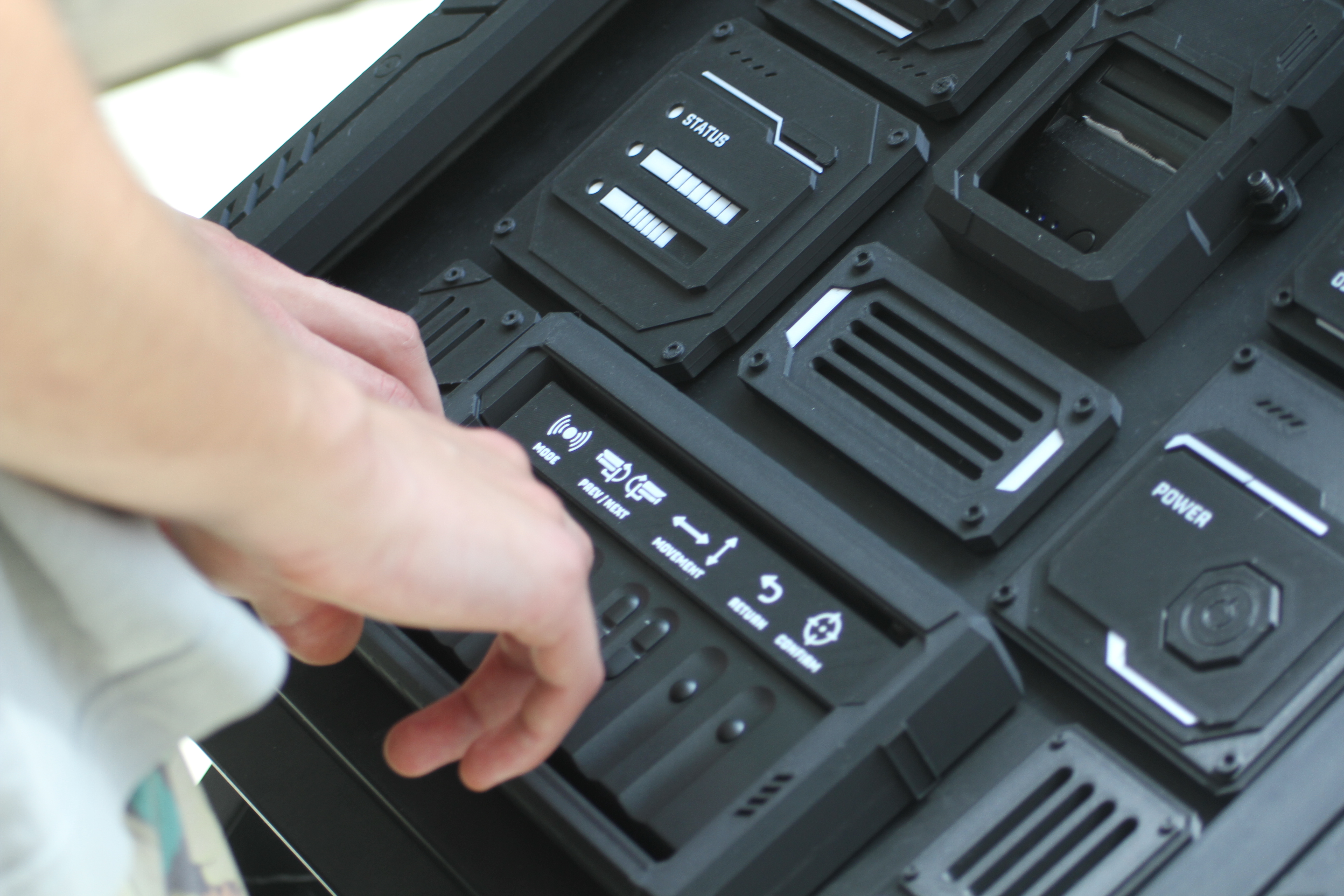
CYBERAWARE isn't only what happens on screen. The experience lives inside a custom-built control console — a fully designed and 3D-printed surveillance panel that visitors physically operate. These are photographs from the finished installation.
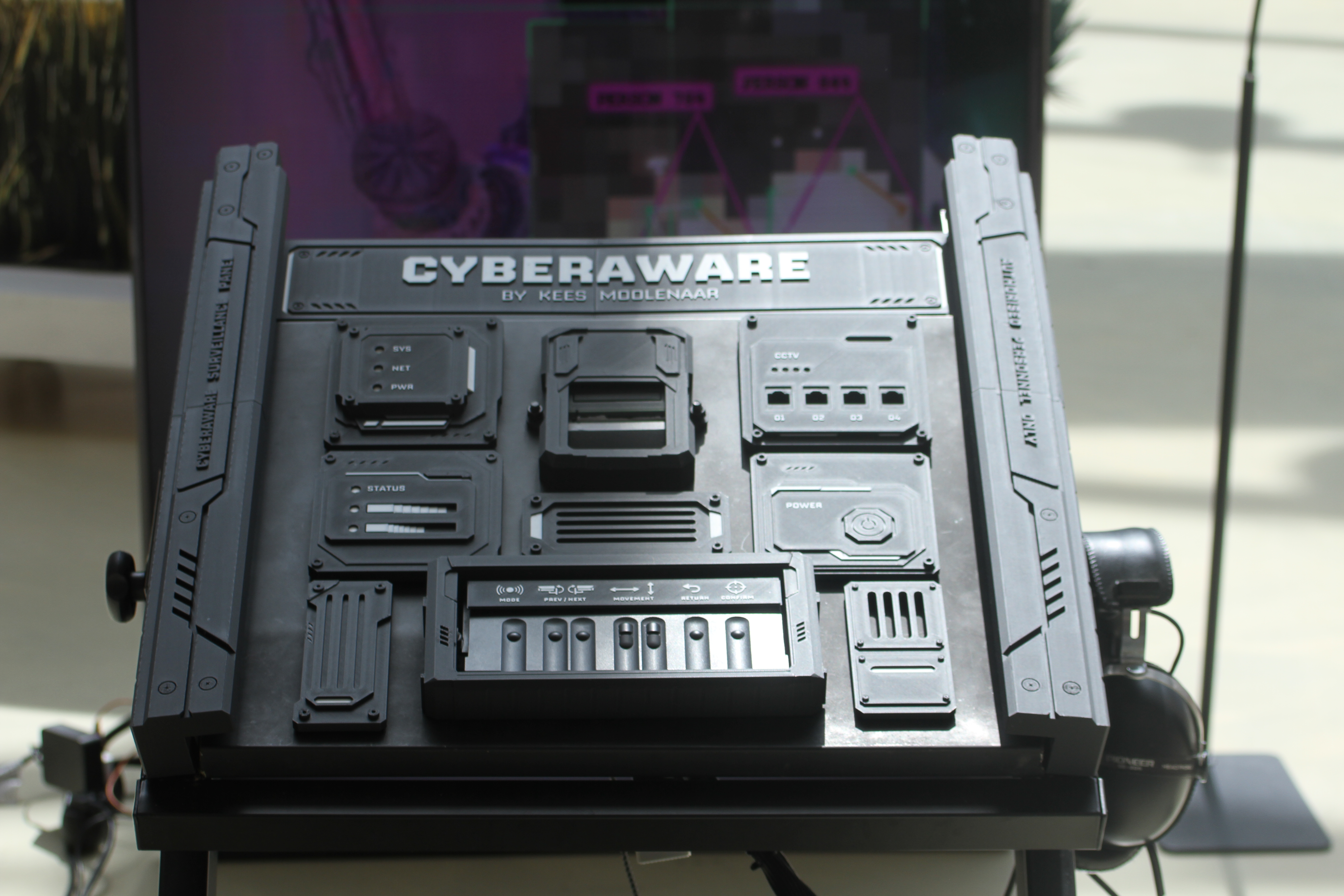
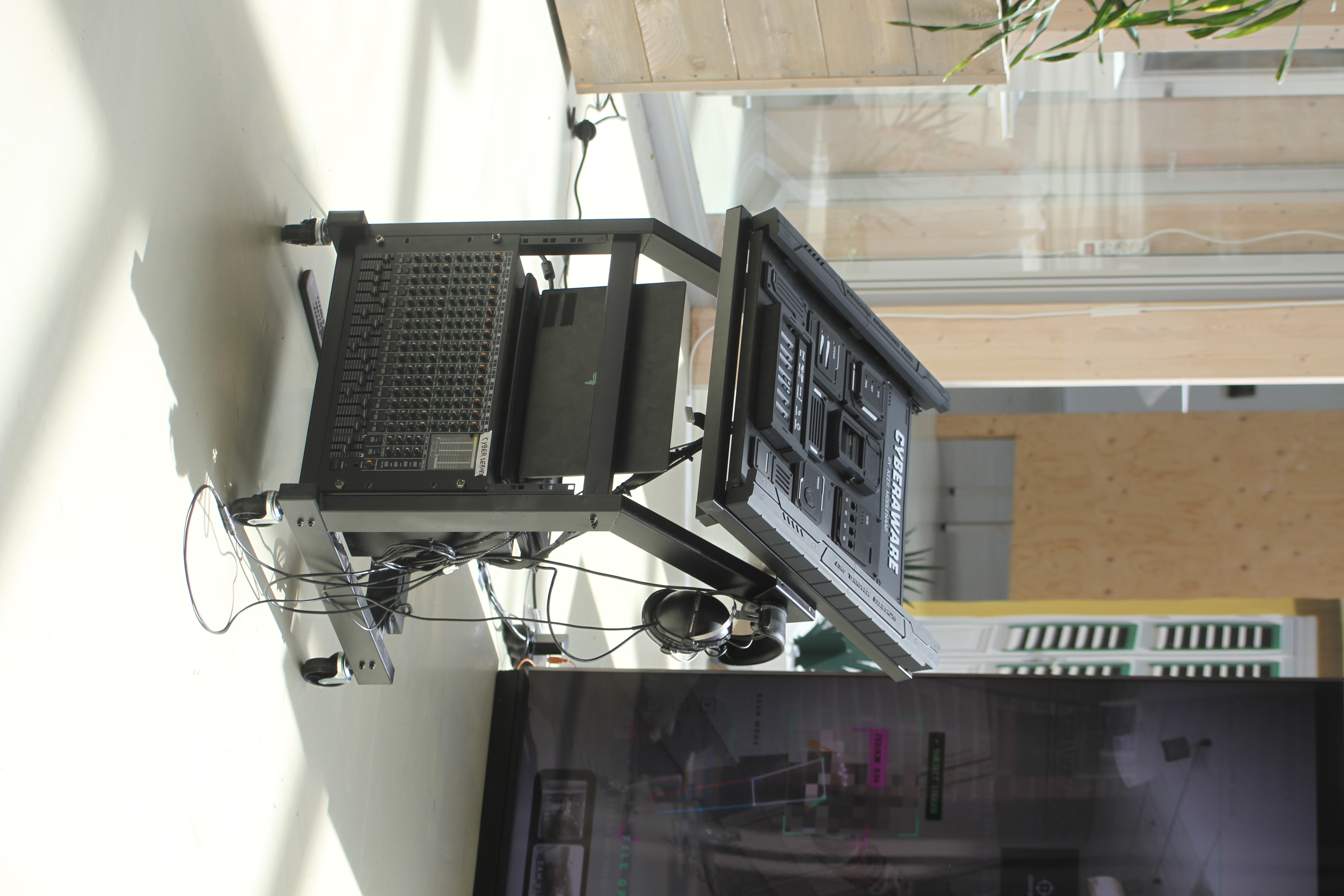
The CYBERAWARE control console, front view
01   The control console — custom-modeled & 3D-printed surveillance panel
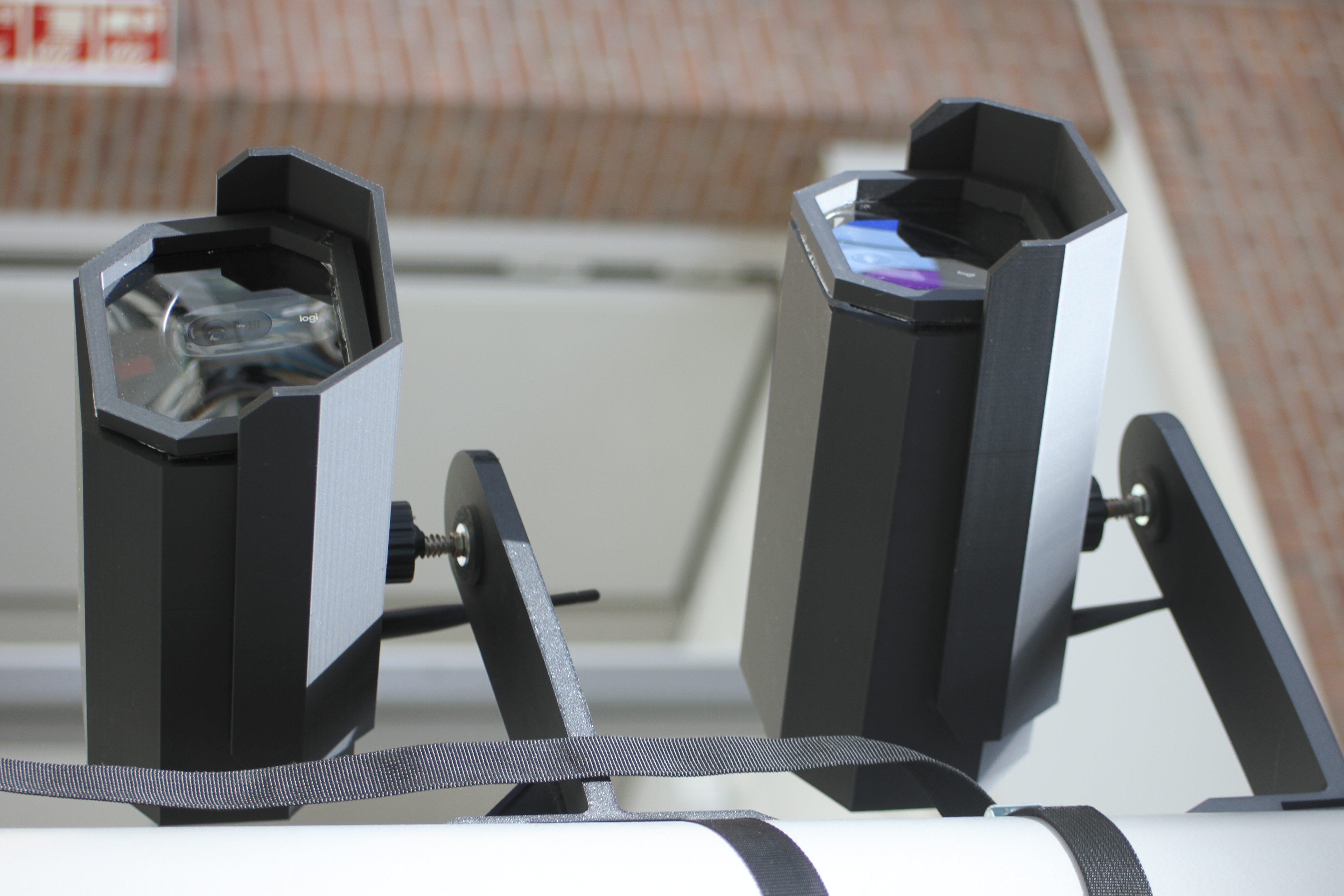
The physical surveillance cameras, real webcams in 3D-printed housings
▸ Live Surveillance
RUNNING ON REAL CAMERAS
The surveillance feeds in CYBERAWARE are real. Each camera is a webcam mounted inside a custom 3D-printed housing, wired to a Raspberry Pi that streams its feed straight into the installation. When you switch between cameras in-game, you're watching the actual space around you — live, in real time.
▸ Interaction

HOW TO PLAY

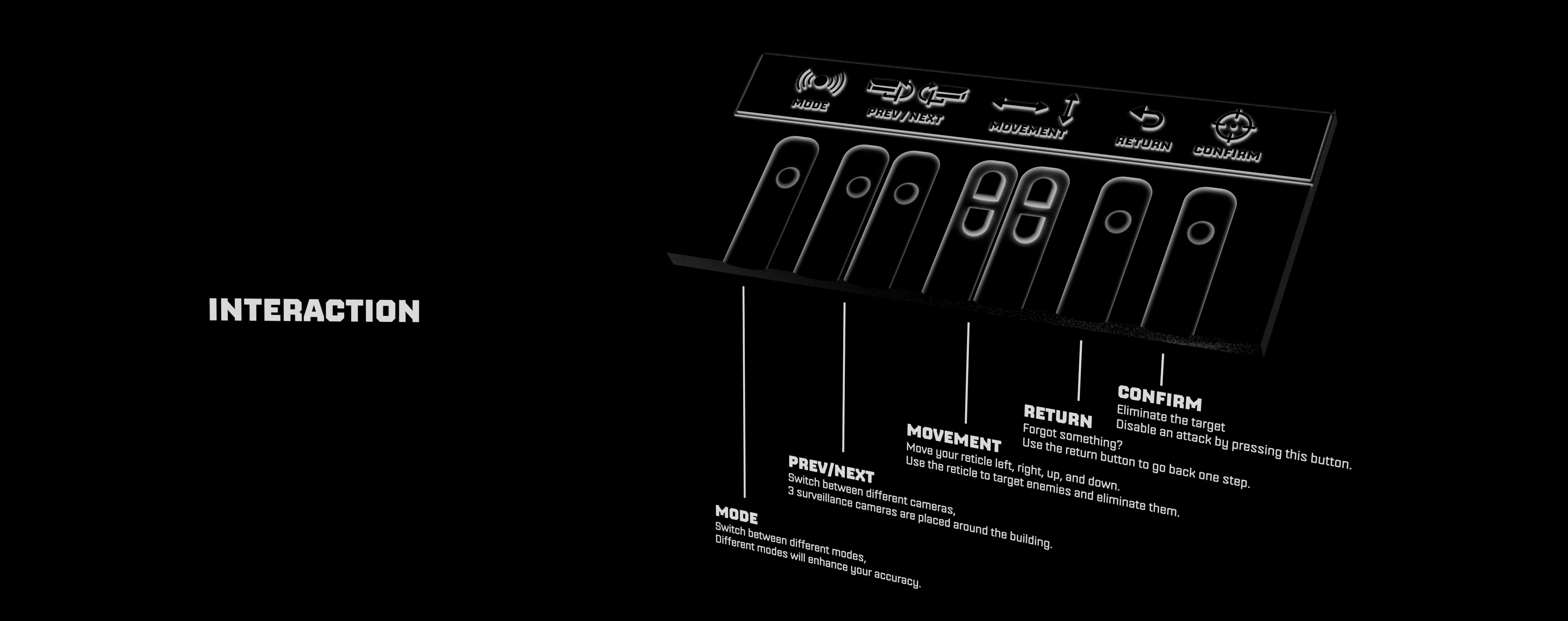
Everything is controlled from the console's physical button bar. Five simple controls let anyone step in and start operating the surveillance system within seconds.

Diagram of the CYBERAWARE control layout: Mode, Prev/Next, Movement, Return and Confirm
▸   The control layout — Mode · Prev/Next · Movement · Return · Confirm
▸ Behind the Scenes

BEHIND THE SCENES

A look behind the build — from the modeling and printing of the panel to the finished, fully interactive installation.

▸   Behind the scenes — building CYBERAWARE
▸ Credits

PROJECT INFORMATION

Created as a final exam installation project exploring the intersection of interactive media, cybersecurity education, and immersive experience design.

Design & Contact
KEES MOOLENAAR
Creative director, 3D artist, and installation designer.

For press, educational licensing, or installation inquiries, get in touch via the portfolio:

KEESMOOLENAAR.COM
Music
SUNG
Music featured in the physical installation by Sung. Used with credit for this non-profit student art project — please go support the artist.

@SUNG_MUSIC
Technology
BUILT WITH
HTML5 / CSS3 / JavaScript
Three.js — 3D rendering
Web Speech API — narration
Web Audio API — sound design
GSAP — animations
Nippo — typeface by Indian Type Foundry